Recent Blog Post
SEE ALL
Tampilkan postingan dengan label Applications Android. Tampilkan semua postingan


Ngga kerasa udah malem banget capek seharian abis edit template mungkin saya masih kyubi kali ya jadi lama editnya kalo udah dewos juga cepet XD aduh kan jadi OOT gini , oke deh capek dari tadi didepan leppy mulu mending langsung liat sendiri aplikasinya yg saya mau share
● Sample accurate playback engine.
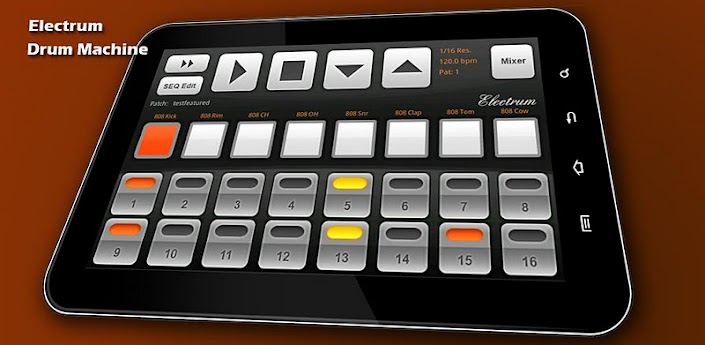
Electrum has 16 sounds and you can program up to 32 patterns. A full sequencer allows you to string the patterns together into songs or longer beats. You can also play patterns "live", switching them as the machine is playing.

Deskripsi :
Pattern based music composition . Programmable drum machine .
Fitur :
● WAV file import - Load YOUR OWN SAMPLES from SDCARD. Long press a sound button to bring up the sample loading dialog.
Use my Sonic Chop app (sold separate) to chop samples from MP3's on your device and load them right into Electrum!
● Use samples and loops to make beats and songs.
● Load up to 16 samples. Swipe Left/Right to access the next eight sample pads
● Load MIDI drum files for quicker programming. Electrum comes with an assortment of pre-made MIDI files.
● Preview (audition) samples LIVE while the machine is playing, they will mix right into the beat.
● Set samples or loops to retrigger on programmed slots or to play completely through before triggering the sample again - useful for using loops!
● Look at the MENU for more options such as ability to save and load your own custom drumkits - once you've loaded the sounds you like unto the pads and adjusted them you can save the settings as a drumkit, separate from the patch itself!
● RECORD samples with the microphone.
● Stretch loops to fit the current project BPM.
● Edit a sample's start and end point, pitch and pan Left/Right.
● Use other time signatures such as 3/4, 6/8, etc.
● Add some swing to your beats with the SHUFFLE setting.
● Add Delay and Distortion FX to your samples
● Play Electrum with an external USB MIDI controller
USB MIDI Control has been tested on:
Galaxy Nexus phone
Galaxy Tablet 10.1
Motorola XOOM
Galaxy Tablet 10.1
Motorola XOOM
● Sample accurate playback engine.
● WAV/MIDI/Pad Export-load your song into Fruityloops!
● Sharing - install the Soundcloud app from the market and you can share beats right to soundcloud (see Electrum's Menu->More->Share)
Electrum has 16 sounds and you can program up to 32 patterns. A full sequencer allows you to string the patterns together into songs or longer beats. You can also play patterns "live", switching them as the machine is playing.
For multitouch devices, Electrum has a multitouch pad dialog as well (See Menu->Play Multitouch pads) where you can play just like an MPC by hitting the pads.
LATENCY OF THE MULTITOUCH PADS DEPENDS ON YOUR DEVICE. SOME DEVICES HAVE VERY BAD LAG RESPONSE. TESTED AS FAST: GALAXY TABLET, DROID X, DROID 1. KNOWN BAD: HTC DESIRE.
HTC WILDFIRE IS TOO SLOW OF A DEVICE TO run Electrum effectively. Sorry, upgrade your device, it's just too slow (523Mhz only).
Please NOTE: The pads on the main screen are not designed to play real time because they are not multitouch. Use the multitouch pads for that.
Also check out my ReLoop music sequencer, which allows you to sequence loops just like Garageband or Sony's ACID.
PERMISSIONS:
PHONE STATE/IDENTITY - used to stop playing if a phone call comes in. IDENTITY is NOT used for anything and it not read at all.
SDCARD WRITE/READ - used to read sound files, and to save settings, patches, and drummkits
Screenshot :


DOWNLOAD
Thanks to : apkmania.co
Screenshot :
DOWNLOAD
Thanks to : apkmania.co
Electrum Drum Machine/Sampler
Halo ~
**** VIDEO MODE ****
*** Please note that VIDEO MODE is still under testing and does not work on all devices/firmwares ***
Hayoo mana yg kamera hpnya masih 2MP? Hmm.. jangan khawatir karna ada aplikasi yg membuat hp anda terasa bagus saat memotret gambar :) oke langsung disimak ya

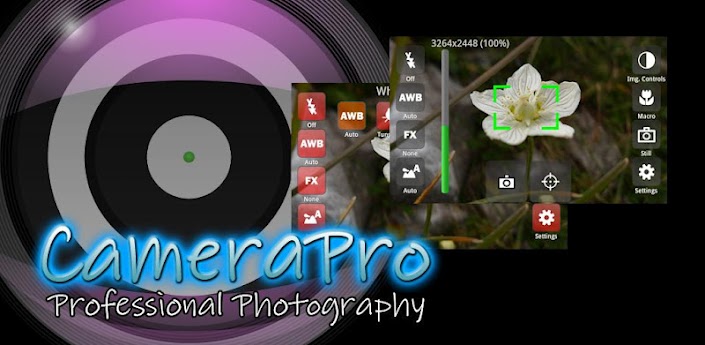
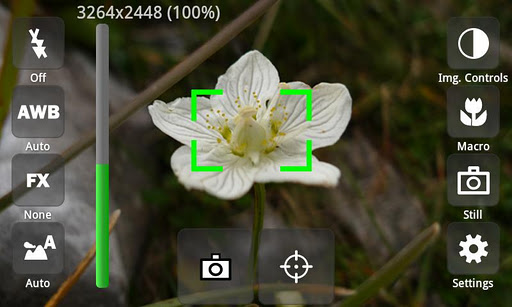
CameraPro offers fast access to your device's camera capturing features. It is highly customizable including different designs and menu arrangements, supports various overlays including histogram, virtual horizon, level meter, compass, and much more.
The following list gives an overview over the features. Features marked with "*" vary between different phone models!
Camera Modes:
- Still (normal mode)
- Self-timer
- Time-lapse: record time-lapse picture series (Android 3.0+: record time-lapse videos too)
- Burst: shoot a set of pictures as fast as the phone supports
- Bracketing: take up to 10(!) different exposed images (can be used for HDR stitching with other apps)
- Anti-shake: take pictures exactly in the moment when the phone is not moving
- Still (normal mode)
- Self-timer
- Time-lapse: record time-lapse picture series (Android 3.0+: record time-lapse videos too)
- Burst: shoot a set of pictures as fast as the phone supports
- Bracketing: take up to 10(!) different exposed images (can be used for HDR stitching with other apps)
- Anti-shake: take pictures exactly in the moment when the phone is not moving
Picture contols:
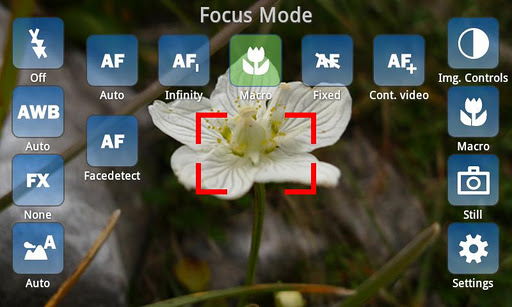
- Focus (autofocus, macro, infinity, continuous autofocus, face detection,...)*
- White balance*
- Flash (including videolight)*
- Effects (such as mono, negative, solarize, aqua, blackboard, night, water, fireworks,...)*
- Scene modes (night, landscape, portrait, beach, snow, fireworks, sports, party, candlelight, text,...)*
- Image controls (exposure compensation, brightness, contrast, sharpness, saturation)*
- ISO*
- Metering mode*
- Antibanding*
- Put text stamp on pictures (for instance date or time) ***NEW***
- Focus (autofocus, macro, infinity, continuous autofocus, face detection,...)*
- White balance*
- Flash (including videolight)*
- Effects (such as mono, negative, solarize, aqua, blackboard, night, water, fireworks,...)*
- Scene modes (night, landscape, portrait, beach, snow, fireworks, sports, party, candlelight, text,...)*
- Image controls (exposure compensation, brightness, contrast, sharpness, saturation)*
- ISO*
- Metering mode*
- Antibanding*
- Put text stamp on pictures (for instance date or time) ***NEW***
Overlays
- Grid (customizable)
- Level meter/virtual horizon with indicator*
- Compass*
- Touch focus (Android 4+)*
- Zooming*
- Mini preview ***NEW***
- Histogram ***NEW***
- Grid (customizable)
- Level meter/virtual horizon with indicator*
- Compass*
- Touch focus (Android 4+)*
- Zooming*
- Mini preview ***NEW***
- Histogram ***NEW***
Settings (excerpt)
- Use volume keys, hardware shutter, trackball, and touch buttons for capturing and focusing*
- Set CameraPro as default camera app*
- Disable shutter sound
- Fullscreen viewfinder*
- Back/front camera (front camera does not support video recording yet)*
- Image compression quality
- Different arbitrary storage locations for video and photos including customizable filenames
- Use volume keys, hardware shutter, trackball, and touch buttons for capturing and focusing*
- Set CameraPro as default camera app*
- Disable shutter sound
- Fullscreen viewfinder*
- Back/front camera (front camera does not support video recording yet)*
- Image compression quality
- Different arbitrary storage locations for video and photos including customizable filenames
**** VIDEO MODE ****
*** Please note that VIDEO MODE is still under testing and does not work on all devices/firmwares ***
- Video / expert video mode (HD video greater than 720x480p is in Beta and works only on some phone models)
Expert video mode (excerpt)
- Automatic bypassing of recording time respectively file size limit by means of file splitting (short gap possible between files)
- Disable audio recording
- Adjust audio channels, sampling rate, audio/video bitrates, frame rates, audio/video codecs, video container format, video dimensions*
- Supports 1080p video recording (e.g. Galaxy S2 GT9100)*
- Automatic bypassing of recording time respectively file size limit by means of file splitting (short gap possible between files)
- Disable audio recording
- Adjust audio channels, sampling rate, audio/video bitrates, frame rates, audio/video codecs, video container format, video dimensions*
- Supports 1080p video recording (e.g. Galaxy S2 GT9100)*
IMPORTANT LIMITATIONS
- For video resolutions greater than 720x480 set focus mode to "Continuous" if available. Else recording might start delayed (app looks as if it hangs for some seconds on the Samsung Galaxy S2)
- Zooming and picture controls can only be modified BEFORE video recording
- Changing from continuous autofocus to some other focus mode can be very slow
- Sometimes the direct HD video preview in the video player (started from CameraPro) shows only a black screen. When the player is started manually the video play back is fine.
- If updating from CameraX fails, uninstall CameraX before installing CameraPro.
- Video recording on some HTC devices and on all devices with Android 2.2 and older is only partly supported
- For video resolutions greater than 720x480 set focus mode to "Continuous" if available. Else recording might start delayed (app looks as if it hangs for some seconds on the Samsung Galaxy S2)
- Zooming and picture controls can only be modified BEFORE video recording
- Changing from continuous autofocus to some other focus mode can be very slow
- Sometimes the direct HD video preview in the video player (started from CameraPro) shows only a black screen. When the player is started manually the video play back is fine.
- If updating from CameraX fails, uninstall CameraX before installing CameraPro.
- Video recording on some HTC devices and on all devices with Android 2.2 and older is only partly supported
HTC/Distorted Pictures:
- Some still picure resolutions on some HTC devices are distored (e.g. 16:9 resolutions). Enable the "HTC fix" under settings to fix.
- Some still picure resolutions on some HTC devices are distored (e.g. 16:9 resolutions). Enable the "HTC fix" under settings to fix.
LG/Viewfinder orientation:
- On some devices the viewfinder orientation is wrong (e.g. LG P500). Enable "Orientation fix" under settings to fix.
Required Android O/S : 2.2+
Screenshot :
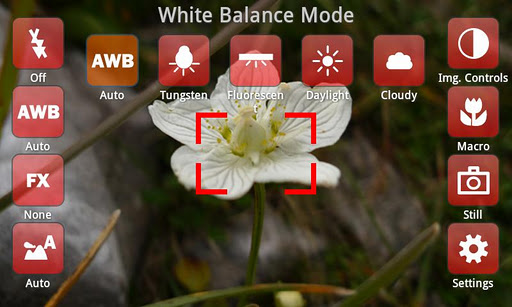
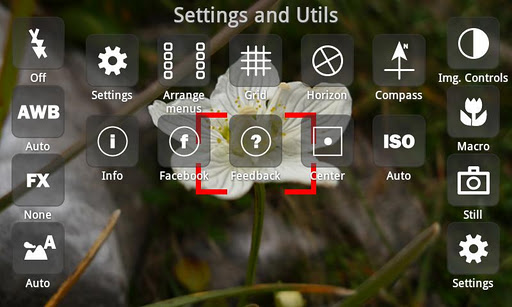
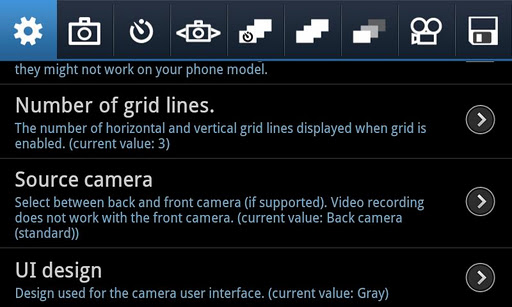
DOWNLOAD
Thanks to : apkmania.co
- On some devices the viewfinder orientation is wrong (e.g. LG P500). Enable "Orientation fix" under settings to fix.
Required Android O/S : 2.2+
Screenshot :
DOWNLOAD
Thanks to : apkmania.co
CameraPro
Hai Sobat !
Kali ini saya mau bagi bagi Aplikasi Android yang berguna banget nih buat hp android kalian , aplikasi ROEHSOFT RAM-EXPANDER - ROOT , ya ini buat memperbesar ram/swap ram , jadinya sd card kalian dimakan berapa MB untuk memperbesar RAM , jangan khawatir untungnya file yg ada di sd card kalian bisa di hapus ko ingat ya ini untuk ROOT user dan kernel kalian juga mempengaruhi bisa tidaknya aplikasi ini , oke langsung aja ya disimak deskripsi dari play storenya

Please try before you buy with 'Memory Info & swapfile check' their device! This is the most powerful version ever! The best for you!
Up to 4.0 GB of memory with a click! Android 1.6 - 4.1 with root access and external SD memory card! More memory means that background tasks can not be terminated, and many programs, wich needs background services will now work correctly!Languages: English and German
Play more Games then ever before, Games wich not run because you have to small memory will now work!
High memory apps, working on every device now!
High memory apps, working on every device now!
Note: please try before you buy with our app "https://play.google.com/store/apps/details?id=com.roehsoft.meminfo" whether their device ROEHSOFT RAM Expander is compatible, you!
- Free SD card memory as a RAM use (SWAP RAM / SWAP MEMORY)
- Swapfile RAM expansion up to 4.0 GB
- The usual performance degradation when paged not occur with sd card from class6
- Widget for PNP swap (swap on / off swap)
- Detailed Memory Information & Analysis
- Autorun
- Swappiness kernel parameter set
- Easy foolproof use
(1 click optimization and automatic calculation)
- Supporting Tung all Android devices (root access and Kernel swap support)
- Swapfile RAM expansion up to 4.0 GB
- The usual performance degradation when paged not occur with sd card from class6
- Widget for PNP swap (swap on / off swap)
- Detailed Memory Information & Analysis
- Autorun
- Swappiness kernel parameter set
- Easy foolproof use
(1 click optimization and automatic calculation)
- Supporting Tung all Android devices (root access and Kernel swap support)
Note: please try before you buy with our app "https://play.google.com/store/apps/details?id=com.roehsoft.meminfo" whether their device ROEHSOFT RAM Expander is compatible, you!
Should it come to problems please contact me before they write such queries to review forum!
not enough memory? equal to no more! More games to play and run more applications simultaneously! All you have to only increase your memory. And up to 4 GB! Larger memory, instead of using task killer or memory optimizer.
ROEHSOFT Ram Expander is more effective than any other tool of its kind Why? The First find out!
ROEHSOFT RAM expander support via a widget at lightning speed and off of extended memory.
MintUpdate you can remove the SD card despite swapfile or deploy via USB.
MintUpdate you can remove the SD card despite swapfile or deploy via USB.
Also, you can important, elementary the swap kernel parameters even control the effectiveness of extended memory increase.
To gain root access you Linkk this helps any further http://shortfuse.org/.
Just affordable entry level phones often have little Ram, help either here or Task Killer programs continue but one uses a swapfile, which is enough memory available. ROEHSOFT Expander turns your device more easily. Many applications, you can start at the same time and do not have to worry about your Ram.
Extends every Android device up to 4 GB of memory in which it creates a swap file on the SDCARD.
Maximum size of the swap file is architecture requires 4GB!
By setting the swappiness value, you can control the behavior of the kernel, the higher the value the more is outsourced.
By setting the swappiness value, you can control the behavior of the kernel, the higher the value the more is outsourced.
Screenshot :


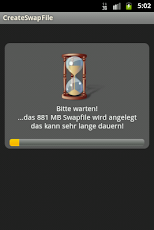
Thanks to : apktop and riski
ROEHSOFT RAM-EXPANDER - ROOT
Hey sobat , bagi yg mau yg sering edit edit foto ga usah khawatir sekarang udah ada aplikasi edit foto dihape android , bagi yg mau download silakan liat deskripsi + screenshotnya ya :v
.jpg)
Deskripsi :
Photos of your daily life and travelling can be depicted as the most memorable moment.
PicsPlay Pro is easier and more convenient than any other editors. Touch and touch! With few taps your photo will be amazingly changed. You can be a professional photographer!
PicsPlay Pro is easier and more convenient than any other editors. Touch and touch! With few taps your photo will be amazingly changed. You can be a professional photographer!
• Youtube Video clip Review : http://youtu.be/2FiOPVRg00g
"It's an incredibly comprehensive picture editing tool!"
- Paul Wilks, Androidtapp.com
- Paul Wilks, Androidtapp.com
"if you think that your current photo-editing app isn’t enough for your needs, JellyBus Inc. has introduced a great new Android app that you might want to try out."
- Waqas Ahmed, Addictivetips.com
- Waqas Ahmed, Addictivetips.com
"Global Partners of Samsung in IFA and Photokina 2012"
[ Special Features ]
• Take a photo and Load a photo
• Undo, Redo, Reset
• Compare with an original photo anytime
• Crop & Rotate
• Environmental Settings
• Undo, Redo, Reset
• Compare with an original photo anytime
• Crop & Rotate
• Environmental Settings
• 200 Professional presets in 10 themes
Themes : Scene, HDR, Blur, ART, Vintage, Grunge, Beauty, Professional, Color Splash, Black & White
Control the opacity of presets
Favorite and History List
Get your own unique effect from unlimited combinations of presets
Themes : Scene, HDR, Blur, ART, Vintage, Grunge, Beauty, Professional, Color Splash, Black & White
Control the opacity of presets
Favorite and History List
Get your own unique effect from unlimited combinations of presets
• Live Tilt-Shift
3 types of Blur effect - Linear, Radial, Oval
Control the blur area and watch your effect simultaneously
3 types of Blur effect - Linear, Radial, Oval
Control the blur area and watch your effect simultaneously
• Time Matrix with temporal photographic effects
Like a time machine, you can travel time with Time Matrix and apply a variety of effects according to the time you set.
Like a time machine, you can travel time with Time Matrix and apply a variety of effects according to the time you set.
• Powerful Editing Tools for both beginners & professionals
Exposure -Brightness & Contrast
Color - Hue & Saturation
White Balance - Color Temperature & Tint
Colored Curve & B&W Curve
Histogram, Smart Sharpen
Exposure -Brightness & Contrast
Color - Hue & Saturation
White Balance - Color Temperature & Tint
Colored Curve & B&W Curve
Histogram, Smart Sharpen
• Photo Decoration
Painting - Size Options, 32 Colors & 48 Color-Patterns, Color Palette, 30 Bokeh, 20 Roll-Stamps, Eraser
Stamp - Tens of stamps and Speech bubbles, Making a stamp with your photo
Border – 34 Border styles, Control roundness and thickness
Texture, Lomo Style Vignetting and so on.
Painting - Size Options, 32 Colors & 48 Color-Patterns, Color Palette, 30 Bokeh, 20 Roll-Stamps, Eraser
Stamp - Tens of stamps and Speech bubbles, Making a stamp with your photo
Border – 34 Border styles, Control roundness and thickness
Texture, Lomo Style Vignetting and so on.
• Photo Sharing to Instagram, Facebook, Twitter, Flickr, Kakaotalk, Line etc! (Official apps should be installed)
• Save in various resolutions
PicsPlay Pro allows you to save a photo in from SNS optimized sizes up to the size of 2048 px.
(The saving size can be differentiated in some Android devices.)
PicsPlay Pro allows you to save a photo in from SNS optimized sizes up to the size of 2048 px.
(The saving size can be differentiated in some Android devices.)
• Manual
PicsPlay Pro is designed for everyone to use conveniently and easily.
PicsPlay Pro is designed for everyone to use conveniently and easily.
Your precious 5 stars encourage us to develop and improve our application constantly. Thank you very much!
We are waiting for your feedback:)
We are waiting for your feedback:)
[ Notice ]
* To solve 941, 921 error, please follow this instruction. (It's a Google Play Store error)
1) Select Settings>Applications>Manage applications>Google Play Store
2) Select 'Clear data', 'Clear cache' and 'Uninstall updates'.
3) Launch Google Play Store and please download again.
Require Android O/S : 2.2+


Download : 16Mb APK

Thanks to : apkmania.com
* To solve 941, 921 error, please follow this instruction. (It's a Google Play Store error)
1) Select Settings>Applications>Manage applications>Google Play Store
2) Select 'Clear data', 'Clear cache' and 'Uninstall updates'.
3) Launch Google Play Store and please download again.
Require Android O/S : 2.2+
Screenshot :
PicsPlay Pro
Halo sobat Galpock kali ini ane mau share aplikasi yang penting banget buat hape sobat namanya Smart RAM Booster Pro langsung diliat aja kali ya fiturnya
How RAM Booster works
RAM Booster is designed to overcome these issues by selectively kill less important apps that are running in the background but consumes considerable device’s memory.
RAM Booster comes with auto-boost in 4 levels: aggressive, strong, medium, gentle.
☆ Aggressive: kill most of low priority apps
☆ Strong: Kill apps that is low priority as well as consume lightly below an “average”
☆ Medium: kill apps that consumes memory above an “average”
☆ Gentle: kill only apps that uses considerable memory
☆ Strong: Kill apps that is low priority as well as consume lightly below an “average”
☆ Medium: kill apps that consumes memory above an “average”
☆ Gentle: kill only apps that uses considerable memory
“Average” is evaluated real-time based on running apps and change over time.
How to work RAM Booster
There are 5 ways to boost
☆ Auto-boost: boost automatically under RAM available & timing conditions
☆ Overlay widget – Enable RAM Booster overlay widget (on by default), adjust widget’s position, and tap on widget to boost anytime you want
☆ Home screen widget – one tap to boost (long-press your home screen>Widget to add RAM Booster widget)
☆ Notification bar – one tap to boost (toggle notification bar visibility in app’s setting)
☆ Boost Now – tap this button from app’s main screen
☆ Widgets, fast reboot, running apps manager
☆ Auto-boost: boost automatically under RAM available & timing conditions
☆ Overlay widget – Enable RAM Booster overlay widget (on by default), adjust widget’s position, and tap on widget to boost anytime you want
☆ Home screen widget – one tap to boost (long-press your home screen>Widget to add RAM Booster widget)
☆ Notification bar – one tap to boost (toggle notification bar visibility in app’s setting)
☆ Boost Now – tap this button from app’s main screen
☆ Widgets, fast reboot, running apps manager
Tool:
☆ 1-click cache cleaner
☆ 1-click cache cleaner
There are plenty options from app’s settings to twist boosting process:
☆ Boost level: select a boost level
☆ Nice themes at your choice
☆ Whitelist apps: apps will not be killed when boosting
☆ Boost automatically: auto-boost, come with minimal RAM threshold and Boost interval
☆ Report style- define how to show reports
☆ Feedback- a haptic feedback when touch on boost widget
☆ Overlay widget position/size - Change overlay widget position/size
☆ Overlay widget transparency- Change transparent/opaque level
☆ OnClick/OnLongClick options for overlay widget
Screenshot:


Smart RAM Booster Pro

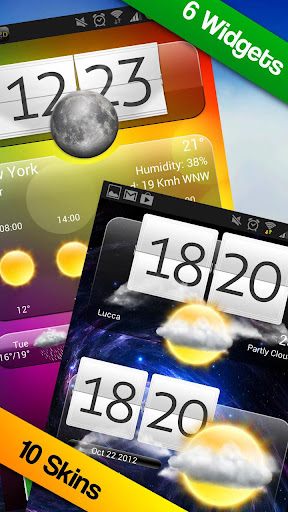
Premium Widgets & Weather play.google.com.premiumwidgets
Incredible high quality Widgets with Weather, skins, HD animations!
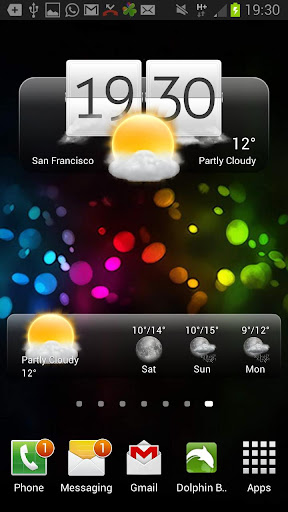
Premium Widgets includes a forecast widget, a small clock widget, and a choice of premium clocks, all supportingchangeable, additional skins.
With just a touch, the app enters full screen mode, including a detail page with beautiful weather HD animations. Other features include choice of weather service , location-aware weather, weather by city name, and automatic language detection.
Features:
- 3 Different Premium Clocks with weather
- Small Clock and weather
- 3-day weather forecasts
- over 40 fancy weather icons!
- Special effects (rain drops, sunshine, clouds)
- Supports unlimited additional skins
- Full Screen HD weather animations (night & day)
- 2 weather services
- Work with city name or GPS
- Fixed update bug
Required Android O/S : 2.1+
Screenshots :



Premium Widgets & Weather v1.3.5 APK
.jpg)
PRO Features :
- 10 band graphic equalizer
- Customizable Home Screen
- Browse by folder
- Crossfade
- Gapless Playback
- Support for FLAC playback in folders view (lossless audio playback)
- Replay Gain
- Personalized station recommendations
- Play streaming audio URL (supported formats only)
- No ads
Required Android O/S : 2.1 +
Screenshot :
.jpg)
DOWNLOAD (6 MB)
Cukup kali ya segitu yaudah lah .
~Semoga Bermanfaat..!!~
Winamp Pro v1.4.7 APK

Memory Booster adalah memori RAM mobile yang kuat & meningkatkan alat yang dirancang khusus untuk pengguna Android Smartphone. Hal ini dirancang untuk menangani masalah sulit namum penting dari manajemen memory untuk semua perangkat Android
Memory Booster mengambil kembali memory yang hilang untuk program Anda dengan defragmenting memori smartphone Anda dan memulihkan kebocoran memori dari aplikasi berperilaku buruk
Screenshot :


Nah sekian yang bisa saya share hanya itu hihi XD , capek ngetiknya .
~Semoga Bermanfaat..!!~
Memory Booster (Full Version) v5.1 APK

Poweramp Music
Player powerampapp.com.poweramp 2.0is the next major release and a free update for everyone, who purchased PowerAMP Full Version Unlocker.
IMPORTANT: PowerAMP v2.0 has completely independent Library implementation. Please ensure you have all your Music
Folders checked in PowerAMP
Settings => Music Folders to
have all your songs in the Library.
Features:
- plays mp3, mp4/m4a (including alac), ogg, wma*, flac, wav, ape, wv, tta, mpc, aiff (* some wma pro files may require NEON support)
- 10 band optimized graphical
- equalizer for all supported
- formats, presets, custom presets
- separate Bass and Treble adjustment
- stereo eXpansion, mono mixing, balance
- crossfade
- gapless
- replay gain
- plays songs from folders and from own library
- dynamic queue
- lyrics support, including lyrics search via musiXmatch plugin
- embed and standalone .cue files support
- support for m3u, m3u8, pls, wpl playlists
- OpenGL based cover art animation
- downloads missing album art
- 4 configurable widget types
- configurable lock screen with optional Direct Unlock
- headset support, automatic Resume on headset and/or BT connection (can be disabled in settings)
- scrobbling
- tag editor
- visual themes, including support
- for external/3rd party skins
- fast library scan
- high level of customization via settings
Changelog (v1.4 => v2.0) :
Audio Engine:
Direct Volume Control for new Android 2.3+ sound system where available. Direct Volume Control results in volume level equal (or higher with positive preamp) to stock player, but with the Equalizer/Tone enabled re-tuned equalizer/tone controls for Direct Volume Control (gives a larger range of distortion-free sound, deeper basses) output limiter. Ensures distortion-free sound even on extreme equalizer/tone amplification levels .mpc, .aiff replay gain support for all supported formats which support Replay Gain (mp3, mp4/m4a, flac, ape, wv, tta, ogg, mpc) Stereo X expansion effect mix-to-mono, balance .
Library/Folders:
custom complete Library/Media Scanner implementation, 10x-100x scan speed comparing to system library tag scanner Music Folder hierarchical selection permanent shuffle. Shuffle session is stored in database and survives PowerAMP restart, phone reboots etc. Menu => List Opts for almost each Folder/Library list with the sorting, view mode, and other per-list options playlist unification, no more Folders vs Library playlists m3u/m3u8, pls, wpl playlist file formats support playlist export from system Library embed cue support (flac, wv, ape) full-library and folders search history of songs played and other smart playlists (Most Played, Top Rated, Recently Played, Recently Added. Each list can be set to be sorted in Reverse. Enable these lists via Menu => Lists Opts in Library) rating system. PowerAMP 2.0 stores ratings in own database only auto advance options moved from Settings to Advance List repeat mode new Shuffle modes: shuffle songs then lists; shuffle lists, songs in order home screen playlist shortcut support voice search support ("Listen to")
UI:
- restyled skins (larger controls, less controls initially visible, expandable menus, bigger album art, etc.)
- ability to load skins from Market/apk/jar files
- OpenGL cover animation
- grid view for folders/albums lists
- new Equalizer/Tone and Library layouts
- new configurable Lock Screen
- new configurable 4x4, 4x2, 4x1, and 2x2 widgets
- improved Settings layout and reorganized options
Other:
- lyrics download (via separate musiXmatch plugin)
- more than 100 changes in total and more are coming in the next PowerAMP 2.x releases!
What's in this version:
- Android 4.2+ lockscreen widget support
- build-519: MusicFX API support (Settings=>Audio=>Advanced Tweaks), useful for Sony devices with custom MusicFX & some CM ROMs
- build-519: Huawei Dolby Mobile support (where available on Huawei devices, like Ascend P1)
- build-519: better ogg buffer management to avoid skips on Samsungs @ 4.1+
- build-519: experimental multiwindow support for Samsung Notes
- build-519: aiff id3v2 embed art
Required Android O/S : 2.1+
Screenshot :


Instructions :
1. Install and run with modded
Google play by ChelpuS or
2. Patch with Lucky Patcher via
custom patch by SanX